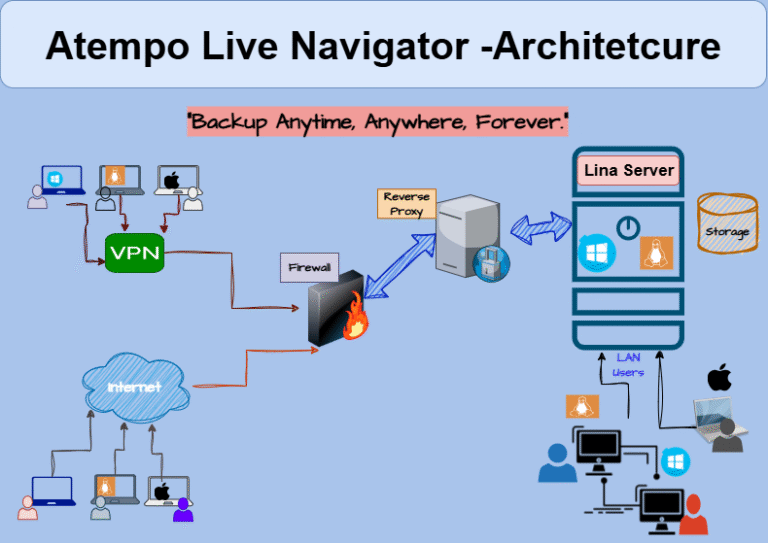
Atempo Lina is a powerful endpoint data protection solution designed to safeguard data on workstations, laptops, and desktops across enterprise environments.
It offers automated, policy-based backup and fast, reliable recovery, ensuring business continuity even in the event of data loss, device theft, hardware failure, or cyberattacks.
Lina is especially valuable for organizations with a distributed or remote workforce, providing centralized control over backup policies, data retention, and restore operations. With support for both on-premises and cloud deployments, Lina helps meet compliance requirements while protecting user productivity. Its lightweight agent, flexible restore options, and scalability make it an ideal choice for enterprises seeking secure and efficient endpoint data protection.
- In an on-premises deployment, Atempo Lina operates through a centralized architecture designed to efficiently protect endpoint data across user devices within the enterprise network.
- The backup process begins with the lightweight Lina agent installed on each workstation, laptop, or desktop.
- Based on defined backup policies—set by the administrator via the Lina Management Console—the agent automatically performs scheduled or real-time backups of selected files and directories.
- The data is encrypted locally and securely transmitted over the internal network to a designated on-premises Lina Backup Server or storage repository.
- Backup versions are maintained according to the organization's retention policies, ensuring efficient storage use and fast recovery.
- In the event of data loss, corruption, or system failure, users or administrators can quickly restore individual files, folders, or complete data sets directly from the on-premises backup repository.
- This setup ensures complete control over sensitive data, reduces reliance on external connectivity, and supports high-speed backup and recovery within the corporate environment.

- In a cloud-based deployment, Atempo Lina provides secure and flexible endpoint data protection for remote and distributed users by leveraging cloud infrastructure.
- The Lina agent, installed on each endpoint device, initiates backups based on centrally defined policies—automatically selecting files, folders, or file types for protection.
- During backup, the data is first encrypted locally on the device to ensure privacy and security, then securely transmitted over the internet using SSL/TLS to a cloud-based Lina Backup Server or cloud storage repository.
- Atempo's intelligent versioning and deduplication features optimize bandwidth usage and storage efficiency.
- Backups are stored in the cloud according to retention and compliance policies set by the administrator.
- In case of accidental deletion, hardware failure, or ransomware attacks, users can quickly restore individual files or entire data sets from the cloud through a self-service portal or with IT administrator support.
- This model is ideal for organizations with mobile workforces or multi-location teams, as it ensures continuous protection and recovery without dependency on on-premises infrastructure.

- The hybrid deployment of Atempo Lina combines the strengths of both on-premises and cloud environments, offering maximum flexibility, scalability, and resilience for endpoint data protection.
- In this model, the Lina agent on each endpoint device initiates backups based on predefined policies.
- The backup data is first encrypted and can be routed either to an on-premises storage system or to a secure cloud repository, depending on the configuration, network availability, or data criticality.
- Frequently accessed data and faster restore points are typically kept locally for performance, while secondary or long-term backups are replicated to the cloud for disaster recovery and off-site protection.
- The Lina Management Console centrally controls policy enforcement, monitoring, and restore operations across both environments.
- This hybrid approach allows organizations to optimize storage, ensure compliance, support remote users, and maintain high-speed recovery, even in distributed or bandwidth-constrained environments.